New patient forms to your first appointment: complete 2026 intake workflow
Instead of rewriting your medical history at check-in, complete new patient dental intake forms online through the method your dental office confirms, then verify both receipt and your appointment separately. For your first visit to Dentistry of Tavares, use this 2026 workflow to organize your information, ask about comfort needs, and arrive ready to discuss your care.
- For Dentistry of Tavares dental intake, confirm the office’s instructions before entering personal information online.
- Complete new patient dental intake forms online with current medications, allergies, medical history, and insurance details.
- Submitting patient paperwork does not confirm an appointment or guarantee insurance coverage.
- Tell the dental office about anxiety, symptoms, and changes since you submitted your forms.
Why this matters
Dental intake connects your health history with the care you receive. Your medications, allergies, current symptoms, and past dental experiences help the dentist understand what needs attention. Accurate information matters more than finishing quickly.
Dentistry of Tavares is a general and cosmetic dental practice for local patients seeking preventive, cosmetic, and restorative care. Start your relationship with a clear description of what you need, whether that is a routine visit, help with a painful tooth, or a conversation about your smile.
For your 2026 first-visit checklist, separate three tasks: completing paperwork, confirming the appointment, and discussing payment or insurance. Finishing one does not finish the others. Keeping those tasks separate prevents a submitted form from being mistaken for a scheduled visit.
Before you start
- Confirm the form source and appointment instructions. Ask the office how to access its current new-patient paperwork, whether online completion is offered, and whether you need to request an appointment separately. Use the method the office confirms rather than a form found through an unfamiliar search result.
- Gather your information. Have your medication list, allergy details, medical history, insurance card if applicable, and previous dentist’s contact information ready. For a child or someone you assist, ask who must complete and sign the forms.
- Check the submission gotcha. Saving a draft or reaching the final page does not necessarily send your information. Before entering sensitive details, confirm how submission is completed and how the office acknowledges receipt. Do not assume an unfinished form saves automatically.
Keep one checklist beside you while you work. Include your main concern and any question you do not want to forget; nervousness can make it harder to remember everything during a visit.
Form access and patient details
Confirm the starting point
- Ask for the current intake instructions. Request the office-approved form access method and any first-visit preparation directions. If you receive a message you were not expecting, verify it with the office before opening attachments or entering health information.
- Confirm whose information belongs on the form. Enter the patient’s details, not automatically those of the person completing the paperwork. A parent, caregiver, or policyholder can have different information from the patient.
- Match your identifying details. Use your current name and date of birth consistently. Tell the office about a name change or a difference between your insurance record and the name you use.
- Check contact information. Review both your phone number and email address. Tell the office how you prefer to receive appointment communications and ask which methods it uses.
Expected result: Your paperwork identifies the correct patient, and you know how to reach the office if you need help. You also know whether the appointment request is a separate step.
Do not guess at unfamiliar wording. If a required question does not fit your situation, ask how to answer it rather than choosing an inaccurate response to move forward.
Choose a completion method
Ask which methods the office accepts before choosing. Online and paper intake serve the same purpose: giving the dental team accurate information.
| Intake method | Best for | Advantage | Limitation |
|---|---|---|---|
| Online forms, when offered | Patients who want to prepare before arriving | You can refer to your records while entering information | Access or submission problems need follow-up; a saved draft is not proof of receipt |
| Paper forms, when accepted | Patients who prefer handwriting or need an alternative to online access | You can complete information without an online account | You must arrange how to obtain and return the paperwork; handwriting needs to be readable |
Choose the accepted method you can complete accurately. If you need help because of vision, language, reading, or accessibility needs, discuss that before your visit. Ask what assistance is available instead of struggling silently with the form.
Health history and visit priorities
Prepare accurate health information
- List current medicines. Include prescriptions, over-the-counter medicines, vitamins, and supplements. Copy names and doses from labels or your medication record when requested; do not rely on memory if you are unsure.
- Describe allergies and reactions. Name the substance and explain what happened. A rash, trouble breathing, nausea, and a racing heartbeat are different experiences, so describe yours plainly rather than labeling every reaction the same way.
- Report relevant health history. Answer the form’s questions about medical conditions, procedures, pregnancy, and other health changes. If you do not know an answer, identify what needs clarification with your clinician or the dental office.
- Explain your dental concern. State where the problem is, what it feels like, and what triggers it. Describe when symptoms began without trying to diagnose yourself.
- Add comfort needs. Tell the office if you feel anxious, have a strong gag reflex, or want explanations before each part of the visit. Ask how you can signal that you need a pause.
Expected result: Your health history reflects your current situation, and the team knows your main concern before discussing care. Do not stop or change prescribed medication just to complete dental intake; ask the prescribing clinician and dentist for instructions.
For a 2026 appointment, review older paperwork rather than copying it unchanged. A medicine that was accurate on a previous form might no longer be current. The same applies to allergies, contact details, and medical conditions.
Set a clear visit goal
Write your main goal in one sentence, such as wanting help with a sensitive tooth or understanding options for replacing a missing tooth. Then prepare three questions for the conversation: what needs attention, what options fit your situation, and what happens next.
You do not need clinical language. Saying that a tooth hurts when you chew gives the dentist useful information. If you are embarrassed about a long gap in care, explain what would help you feel comfortable discussing it.
Insurance details and submission
Separate insurance from treatment decisions
- Enter insurance information carefully. If you have dental insurance, use the details on your current card. Distinguish the patient from the subscriber when those are different people.
- Ask about acceptance and network status. Confirm these directly for your specific plan. Listing insurance on a form does not establish that the practice participates in your plan’s network.
- Ask what still needs verification. Discuss benefits, exclusions, and any authorization requirements relevant to proposed care. An appointment confirmation is not a coverage decision.
- Discuss payment questions before agreeing to treatment. Ask for an explanation of your expected responsibility and what payment arrangements, if any, apply. Do not assume that an intake form establishes eligibility for a financing option.
Expected result: Your insurance information is ready for review, and you know which questions remain open. For more detail, read the guide to understanding your dental insurance.
If you do not have dental insurance, say so when you request the visit. Ask Dentistry of Tavares about payment arrangements for your dental care rather than assuming you need a policy to begin the conversation.
Finish and verify submission
- Review your answers. Recheck medications, allergies, contact details, and your reason for visiting. Correct errors before completing the final submission step.
- Read acknowledgments before signing. Ask about anything you do not understand, including how your information is used. Completing paperwork should not require guessing what you are agreeing to.
- Follow the form’s actual completion instructions. Use the final action shown by the office-approved system. Do not close the page merely because every field looks filled in.
- Verify receipt. Look for the confirmation the system provides, or ask the office whether your paperwork arrived. Keep any confirmation securely without posting health information publicly.
Expected result: You have either a submission acknowledgment or direct confirmation from the office. If receipt is uncertain, resolve that before assuming the forms are complete.
Appointment confirmation and arrival preparation
Confirm the visit separately
- Verify the appointment details. Confirm the date, time, location, and reason for the visit. Make sure you understand whether you are requesting an appointment or have received a confirmed appointment.
- Ask what the visit includes. Do not assume the first appointment automatically includes a cleaning, imaging, or treatment. Ask what is planned and what decisions depend on the dentist’s evaluation.
- Ask what to bring. Confirm requirements for identification, insurance information, medication records, and previous dental records. Ask how records should be transferred rather than sending sensitive files through an unconfirmed channel.
- Check preparation instructions. Follow directions specific to your visit. Do not fast or change medication based on a general intake guide.
- Ask when to arrive. Use the office’s requested arrival time instead of choosing a generic early-arrival rule.
Expected result: You know where to go, what to bring, and what the appointment is intended to address. Keep a short list of unresolved questions for check-in.
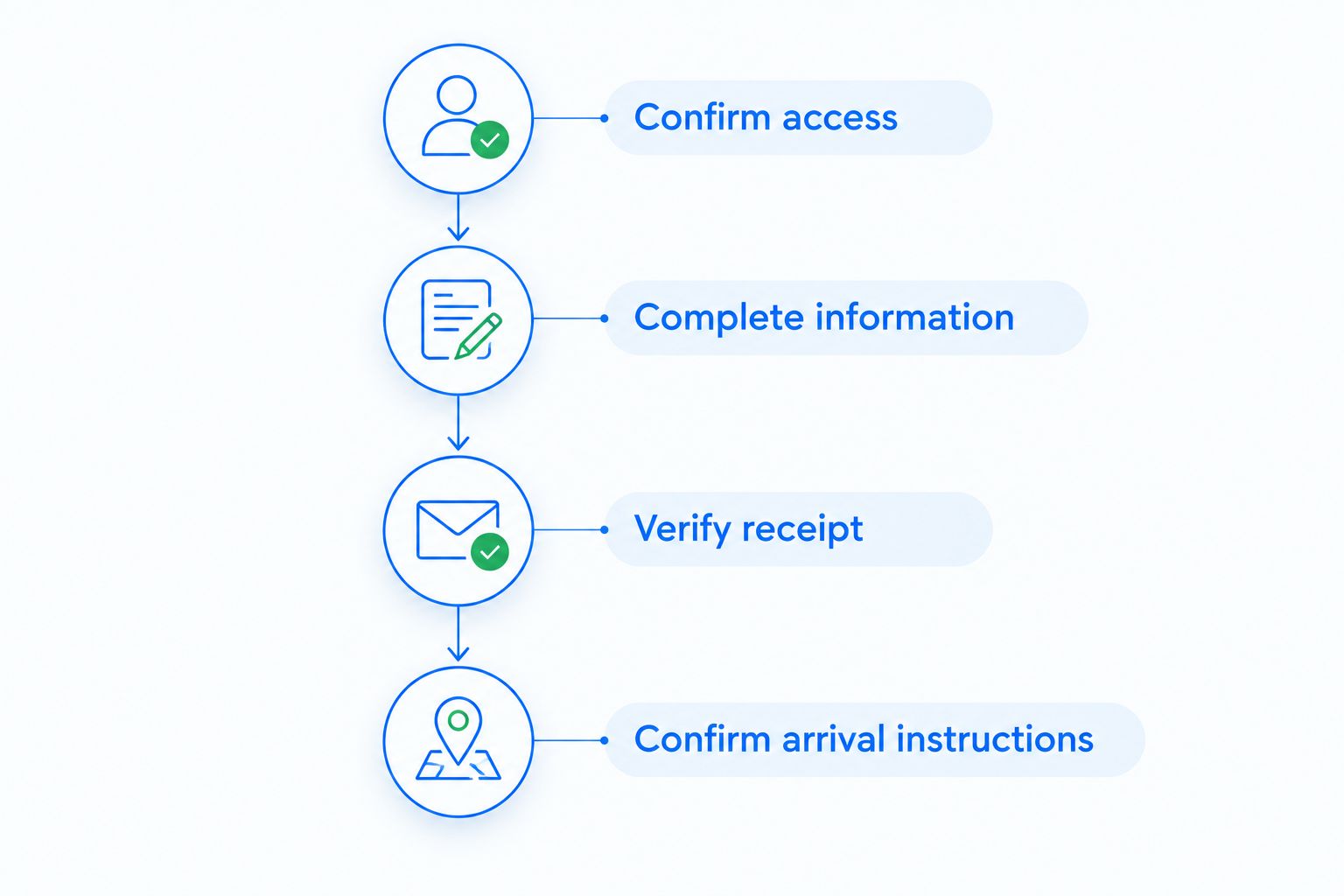
Use this sequence for your 2026 intake: confirm access, complete information, verify receipt, then confirm arrival instructions. Each checkpoint answers a different question.
Update your forms when something changes
Your intake workflow does not end when you submit the paperwork. If you start a medicine, develop a new symptom, change insurance, or receive a medical diagnosis before the visit, tell the office.
- Identify the change. Write down what is different from your submitted answers and when the change happened.
- Ask how to update the record. Follow the office’s instructions for editing a form or providing a correction. Do not assume you can reopen a submitted form.
- Confirm important changes at check-in. Mention medication, allergy, and symptom updates directly, even if you already sent a message.
Expected result: The dentist reviews your current information rather than relying only on an earlier submission. For a rescheduled 2026 visit, review your forms again if your circumstances have changed.
Troubleshooting
- The form link does not open. Verify that you are using the link provided through the office-confirmed method. Try a current browser, then ask the office for help or an accepted alternative. Do not send medical details to an unfamiliar website that offers to fix the problem.
- You finished, but there is no confirmation. Check whether a final submission action remains. Ask the office to verify receipt before repeatedly submitting the same paperwork; repeated attempts can create confusion about which answers are current.
- A required question has no accurate answer. Ask the office how to record unknown or not-applicable information. Do not invent a medication dose, diagnosis, or insurance identifier just to pass validation.
- You submitted an incorrect answer. Contact the office with the correction and ask how to update the record. Mention important health corrections again when you arrive.
- Your symptoms need attention before paperwork is finished. Contact the dental office rather than waiting to complete forms. Ask about same-day help when possible; do not treat an online form as an urgent-care communication channel. Trouble breathing or swallowing needs immediate emergency medical attention.
Customize your workflow
Make the paperwork useful for the conversation you want to have. If anxiety is your main concern, ask for explanations and discuss how to request breaks. Do not assume a particular sedation method is offered or appropriate without speaking with the dentist.
If you receive care from several clinicians, prepare their contact details and ask whether records are needed. If you are helping a family member, clarify permission and signature requirements before submitting information on their behalf.
Keep sensitive records somewhere secure. Avoid storing medical details on a shared device unless you understand who can access them, and sign out when you finish.
For your 2026 first appointment, leave room for a conversation rather than trying to solve every treatment question in the intake form. Your answers help start the evaluation; they do not replace it.
FAQ
How do I complete new patient dental intake forms online?
Get the current form instructions directly from your dental office, enter accurate patient and health information, and complete the final submission step. Verify receipt separately from your appointment confirmation.
Can I book my first dental appointment by submitting forms?
Submitting intake forms does not necessarily book an appointment. Confirm the date and time directly through the office’s appointment process.
What information should I have ready for dental intake?
Prepare your current medications, allergies, medical history, main dental concern, and insurance information if applicable. Ask the office whether identification or previous dental records are also needed.
Does Dentistry of Tavares accept my dental insurance?
Confirm your specific plan directly with Dentistry of Tavares. Entering insurance information on dental intake forms does not establish acceptance, network participation, or coverage for treatment.
What if I cannot complete dental forms online?
Ask the office which alternative completion methods it accepts and what assistance is available. Arrange that before the visit so you know how to provide your information.
Should I tell the dentist that I am nervous?
Yes, explain your concerns before the appointment and again when you arrive. Ask about explanations, breaks, and ways to signal discomfort; discuss any additional comfort options directly with the dentist.
Will my first dental appointment include a cleaning?
Ask the office what is planned for your first appointment. Examination findings and your individual needs determine which care is appropriate, so paperwork alone does not guarantee a cleaning or treatment.
What should I do if my health changes after submitting forms?
Tell the office what changed and ask how to update your record. Confirm medication, allergy, and symptom changes directly at check-in, even if you previously sent a message.
One last thing
The most useful final check is a spoken update. Before the dentist begins, mention anything that changed after you completed the forms and name your main concern again. A correct form supports that conversation; it does not replace it.
If something is difficult to explain, bring a short written note. You deserve time to ask questions and understand the proposed next step before deciding on care.
Related guides
- Same-day dental emergency appointments in Tavares
- Dental care during pregnancy
- Dental care for seniors
Ready to plan your first visit? Request an appointment with Dentistry of Tavares and ask which intake steps to complete before you arrive.